> For the complete documentation index, see [llms.txt](https://docs.swiftproxy.net/llms.txt). Markdown versions of documentation pages are available by appending `.md` to page URLs; this page is available as [Markdown](https://docs.swiftproxy.net/zh-tw/dai-li/ji-cheng-dai-li/zhu-zhai-dai-li-ji-cheng/octobrowser.md).
# OctoBrowser
## **為何選擇 OctoBrowser?**
主要原因如下:
1. **先進的多帳號管理與反偵測技術**\
OctoBrowser 允許您在單一設備上建立並管理數千個獨立瀏覽器配置檔。每個配置檔皆擁有獨特且真實的數位指紋,大幅降低帳號被封或跨平台被關聯的風險。
2. **高效的團隊協作與自動化功能**\
提供靈活的團隊角色管理、基於標籤的配置檔存取控制及詳細活動日誌。此外,Octo 支援完整 API 存取,讓您能使用偏好的程式語言自動化配置檔的建立、使用與刪除。
3. **強大的資料安全與隱私保護**\
OctoBrowser 透過多層加密保護敏感資料,包括用戶密碼、資料庫金鑰及配置檔憑證。搭配雙重身份驗證及密碼保護配置檔功能,即使在共用環境中也能確保資料安全。
綜合來說,OctoBrowser 以其強大的反偵測能力、卓越的自動化功能及企業級安全防護,成為數位行銷人員、電商賣家及多重線上身份管理者的理想選擇。
## **如何配置 OctoBrowser 和 Swiftproxy 住宅代理?**
### **Step 1: 獲取代理信息與下載**
1. 從[官方網站](https://octobrowser.net/download/)下載並安裝 OctoBrowser
2. 前往 Swiftproxy 官網獲取您的代理IP
* [**API 獲取**](/zh-tw/dai-li/zhu-zhai-dai-li/huo-qu-dai-li/api-qu-de.md)
* [**賬密認證**](/zh-tw/dai-li/zhu-zhai-dai-li/huo-qu-dai-li/zhang-mi-ren-zheng.md)
### **Step 2: 在 OctoBrowser 中配置 Swiftproxy**
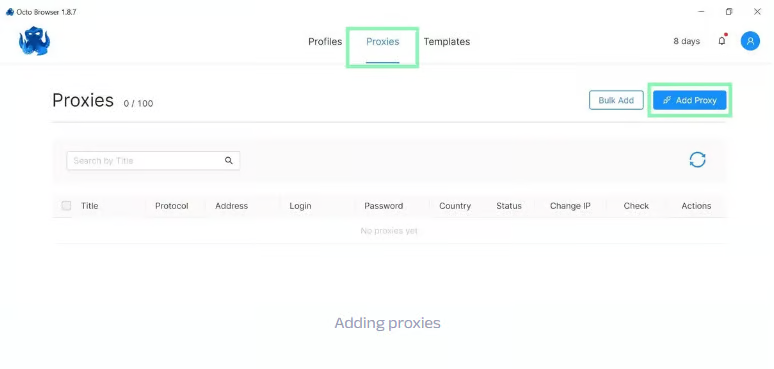
1. 首次開啟 OctoBrowser,登入後,點擊【Proxy】,然後點擊【Add Proxy】
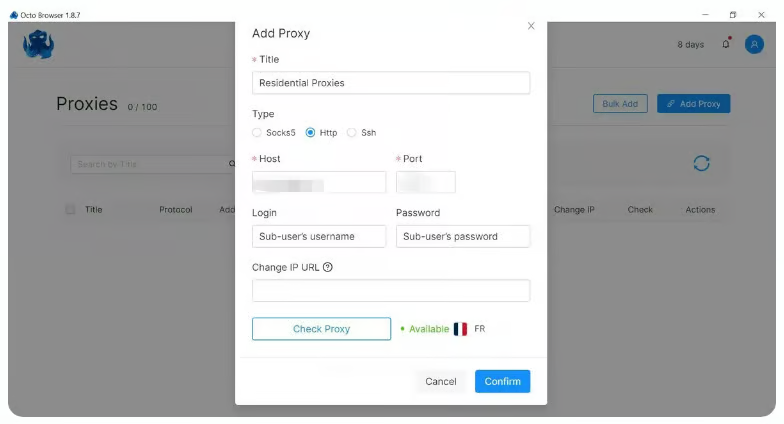
 2. 進入代理設定頁面,將從 Swiftproxy 用戶中心複製的代理字串貼上,點擊【check proxy】測試代理是否可用,若成功,最後點擊【confirm】完成設定\
**注意**:所需的代理詳情可參考Step1**.**
2. 進入代理設定頁面,將從 Swiftproxy 用戶中心複製的代理字串貼上,點擊【check proxy】測試代理是否可用,若成功,最後點擊【confirm】完成設定\
**注意**:所需的代理詳情可參考Step1**.**
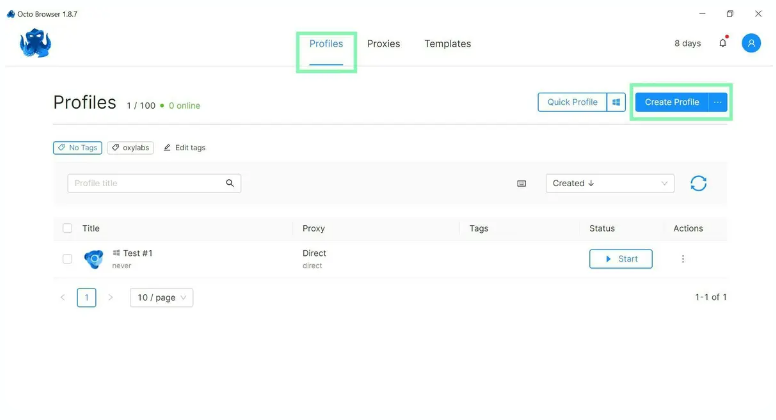
 3. 前往【Profiles】,點擊【Create Profile】來建立新的配置檔
 4. 設定完成後,從您預先配置的代理列表中新增代理。您可以在配置檔內選擇【Proxy】區域,或在編輯配置檔時切換到【Connections】標籤頁進行設定
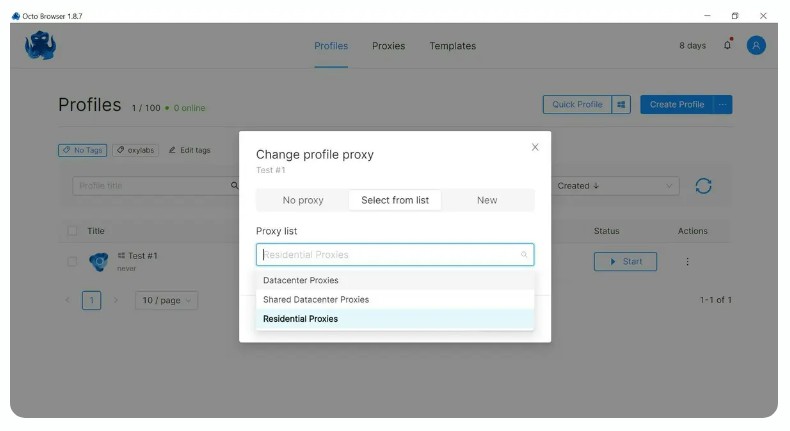 5. 您的配置檔已成功綁定代理!